
Gigaset-SL610H Dect Handset
- Buy 5 for £91.20 £76.00 each and save 1%
- Buy 10 for £90.00 £75.00 each and save 3%
- Buy 15 for £88.80 £74.00 each and save 4%
The Gigaset-SL610H Dect Handset comes with an AC power supply
The Gigaset-SL610H Dect Handset has 15 Hours Talk 230 Hours Standby Battery Life
The Gigaset-SL610H Dect Handset supports Bluetooth
The Gigaset-SL610H Dect Handset has a 1.8” QQVGA 128 x 160 Pixel TFT Display, 64k Colours 7 Lines Main LCD
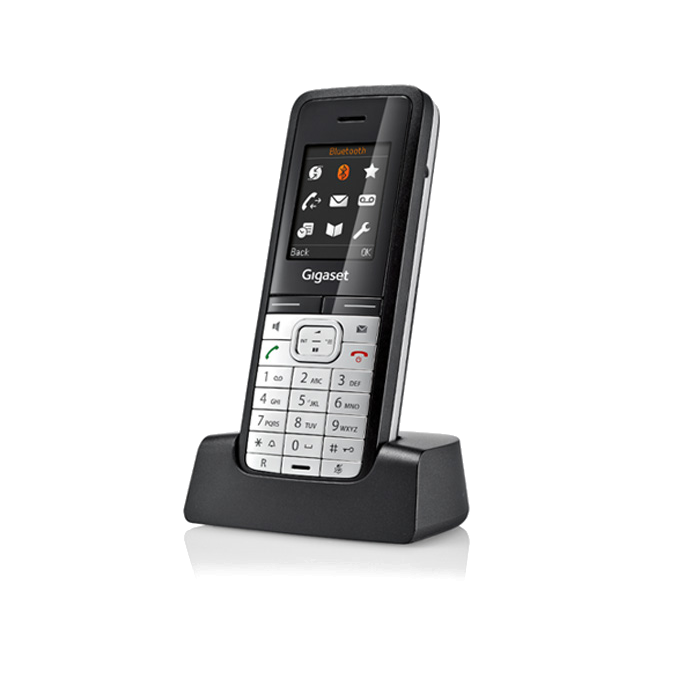
The Gigaset SL610H Dect Handset includes the following features:
Brilliant, 1.8“ TFT colour display with 7 lines
Intuitive, icon-based user interface
Headset connection via Bluetooth® or 2.5 mm jack
Convenient data exchange via Bluetooth® or mini-USB
Vibrating alert
Time-specific, 'do not disturb' function for external, non-VIP calls
Hands-free talking with brilliant sound quality
4 hands-free profiles for personal voice quality experience
Organiser with calendar and reminder functions
Ergonomic keypad with adjustable illumination and keypad protection
The Gigaset SL610H has a new contemporary GUI with icons and soft keys also; the Gigaset SL610H has effortless navigation due to its text-based sub-menus. Whether you are an advanced user or just a beginner the SL610H is suitable for you; it has two different menu views for your individual needs: simple and complete
In addition the Gigaset SL610H displays caller indication in two different ways CLIP and CNIP. If you are having trouble knowing whose phone is getting called, on the Gigaset SL610H there are 23 ringer melodies so it will make it a lot easier to determine which phone is ringing. Furthermore; the SL610H has anonymous call silencing so you will not be hassled by sales people on anonymous numbers
The Gigaset SL610H can connect to any PC interface via mini-USB or Bluetooth by using the Gigaset QuickSync software. The Gigaset QuickSync on the SL610H cleverly syncs all the contacts of Microsoft Outlook straight to the local directory on the phone this will vastly reduce hassle because you will not have to enter the contacts manually. Also using the QuickSync feature on the Gigaset SL610H you can transfer your personal pictures from your PC to your SL610H; these pictures can be used for caller ID or for a screensaver picture show, in addition to this you can transfer sound files from your PC to the SL610H via QuickSync. When you have your PC and SL610H connected via QuickSync all your incoming calls will be displayed on your PC so you know when you are getting called. The Gigaset SL610H has connectivity compatibility with any Bluetooth enabled headset. Due to the SL610H Bluetooth® capabilities you can exchange vCards with mobile phones with Bluetooth
| Warranty | 12 Months Warranty |
|---|---|
| Main LCD | 1.8” QQVGA 128 x 160 Pixel TFT Display, 64k Colours 7 Lines |
| WiFi Support | No |
| Power Options | AC Only |
| AC PSU Included | Yes |
| HD Voice | Yes |
| Headset Interface | Bluetooth or 2.5mm Jack |
| Speakerphone | Yes |
| Bluetooth | Yes |
| Range | Indoor: 50m Outdoor: 300m |
-
 Gigaset-S79H Dect Handset£60.00 £50.00
 -
 Gigaset-S810H Dect Handset£60.00 £50.00
 -
 Gigaset-SL400H Dect Handset£87.60 £73.00